Job interviews
Follow every question, even in a language you are still learning. Accuracy matters more than speed here — so that is what we optimise for.
A Chrome extension that turns speech in any tab — calls, lectures, streams, videos — into subtitles in your language.
Free minutes after you confirm your email. No card required. When they run out, a free mode keeps the subtitles going.
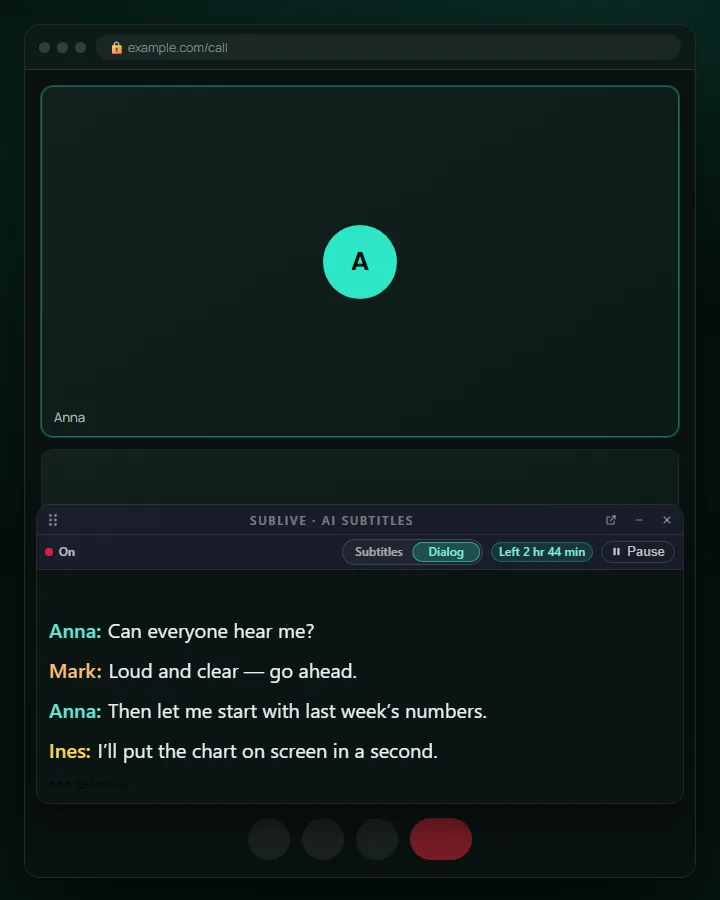
Meetings are only the loudest case. SubLive captions any audio your browser plays — same extension, same floating window, whatever is in the tab.
Follow every question, even in a language you are still learning. Accuracy matters more than speed here — so that is what we optimise for.
Stop nodding along. Read what was actually said, with the terminology your company uses, from its shared glossary.
A university recording, an online course, a webinar you joined late. Keep up with a lecturer speaking another language, and keep the transcript afterwards — if you choose to save it.
A live stream cannot be downloaded and translated later — it is understood now or not at all. Twitch, YouTube Live, news and sport get subtitles while the words are still being spoken.
A video with no subtitles, a podcast in the web player, an audiobook. Read it in your language — or in both at once, which is how people use it to learn one.
Family calls in a web messenger, an appointment with the bank, a city council stream. The conversations you cannot postpone until your language gets better.
Read more:Meetings and callsLectures and coursesLive streamsVideos and podcasts
Chrome 116 or newer.
10 common spoken languages are detected automatically. For any other, you pick it once from the list.
Captions appear in a window on the page — one click puts it above other tabs and other apps.
The core of SubLive: live subtitles in your language, wherever the sound plays, in a window that stays where you put it.
Live subtitles in 60 languages, about a sentence behind the speaker. Videos with their own subtitles are translated ahead — with no delay.
Google Meet, Zoom Web, webinars, online courses, live streams, YouTube and podcasts — no bot to invite, no app to install.
A floating subtitle window above other tabs and apps, or an overlay on the page itself.
The translation is read aloud while the original gets quieter. A free browser voice or a more natural AI voice.
Also included:Company glossariesSubtitles or dialogShare your minutesTranscript and AI summaryRecap in your inbox
No seats and no per-person licences. Buy hours once and they stay on your balance until you use them, or take a monthly plan where the hours refresh every month. Your first minutes are free.
€14.99one-off
incl. VAT
5 hours of subtitles
€3.00 per hour
€39.99one-off
incl. VAT
15 hours of subtitles
€3.00€2.67 per hour
€59.99one-off
incl. VAT
25 hours of subtitles
€3.00€2.40 per hour
In every plan here: Fast translation model · Hours never expire · Share your hours with others by code · Transcripts only if you switch them on — download them from the extension; the server forgets them in 24 hours
Read the security page and the list of subprocessors. We name every third party that can touch your data.
60 languages: most official EU languages, the Balkans, Arabic, Russian and Ukrainian, plus Japanese, Korean, Chinese (Simplified, Traditional and Cantonese), Hindi and nine other languages of India, and a growing list of others including Hebrew, Indonesian, Thai and Vietnamese. 10 spoken languages are detected automatically — Dutch, English, French, German, Hindi, Italian, Japanese, Portuguese, Russian, and Spanish; for the rest you name the spoken language once. See the full list on our languages page.
Yes. SubLive captions any Chrome tab that plays audio, so Google Meet, Zoom Web, Microsoft Teams in the browser, webinars, YouTube and podcasts all work the same way. There is nothing to invite to the meeting and nothing to install besides the extension.
No. Audio exists only in memory while a sentence is being processed. Text transcripts are saved only if you turn that on, and they expire automatically.
SubLive translates what the tab plays — the other people, not you. The microphone is used in two cases only, and both are your choice. When you turn on transcript saving, the extension asks for the microphone so your own replies are in the transcript too; you can mute it from the subtitle window at any time. When you turn on “Stop dubbing while I speak”, the microphone only measures how loud it is around you, on your computer, so the dubbing pauses while you talk; nothing from it is recorded or sent. Your own voice is never translated and never shown as subtitles.
Yes. Installing is free and you get free minutes after confirming your email — no card required. After that you buy hours of subtitles. The smallest pack is 5 hours for €14.99, which is €3 an hour; 25 hours cost €59.99, which is €2.40 an hour. Hours bought this way never expire. If you use SubLive every week, a monthly plan is cheaper per hour — those hours refresh each month and unused ones do not carry over. When the minutes run out, subtitles keep working for free on Chrome’s own recognition and translation — fewer languages, and no AI voice, Answers or saved conversations.
It depends on what you are watching. When a video has its own subtitles — on YouTube or in a player with a subtitle track — SubLive translates them ahead, and each line appears together with the speech, with no delay. Everywhere else it translates what it hears: a phrase has to be said before it can be translated, so subtitles run about a sentence behind the speaker, and the spoken translation a little later still. Calls and live streams always work this second way.
See all 60 supported languages →Frequently asked questions →How SubLive compares with meeting bots and built-in captions →
Looking for a Fireflies alternative that translates while the call is on? How note-takers and live subtitles differ, with no bot joining the meeting.
How to get Microsoft Teams live translation: what Teams includes, what needs an add-on, and how to read translated subtitles in Teams on the web.
Live captions translation for any tab: get translated subtitles for calls, webinars, lectures and streams in Chrome, from the audio the tab plays.
SubLive is a live translation extension for Google Chrome that turns speech into real-time subtitles in 60 languages. Install it once and it works inside the tab you are already using — video calls in Google Meet or Zoom Web, webinars, online lessons, job interviews, customer support chats and streaming video. There is no meeting bot to invite, no desktop application to install and no configuration beyond choosing the language you want to read.
The extension detects 10 common spoken languages automatically (any other you name once) and shows translated captions in a floating window or as an overlay on the page itself, so conversations keep their natural rhythm. Teams use SubLive for multilingual standups and client calls, students use it for lectures held in another language, and support agents use it to answer customers in their own words. Audio is processed in the moment and is never stored; transcripts are saved only when you explicitly turn the option on.
Pricing works two ways, and you pick the one that fits. Buy hours once — 5 hours for €14.99 at €3 an hour, or 25 hours for €59.99 at €2.40 — and they stay on your balance with no expiry date. Or take a monthly plan, from €34.99 for 15 hours a month at €2.33 an hour, where the hours refresh every month and unused ones do not carry over. Companies buy in 50-, 100- and 200-hour steps, one shared balance for the whole team, either way. Add SubLive to Chrome for free and start your first translated conversation in under a minute.
The session stays under your control while it runs. Captions can be a single running line or a dialog split by speaker, shown in a floating window that stays above other applications or as an overlay on the page itself; font, size, colours, opacity and the number of lines are adjustable, and the recognised original can sit under each translation. Pausing stops the meter, so nothing is spent while nobody is talking. When speech has music or background noise behind it, naming the spoken language yourself keeps recognition steadier than leaving it to detection. And a code created inside the extension lets a colleague, a client or a student run their own subtitles from your balance — for as long as you allow, and no longer.