SubLive's Answers panel gives answer suggestions during an interview or a call. When the other person asks something factual or technical, a short answer appears in a Chrome side panel next to the live subtitles, in your language, a few seconds after the question. It doesn't join the call, and it doesn't write your replies for you.
What the panel shows
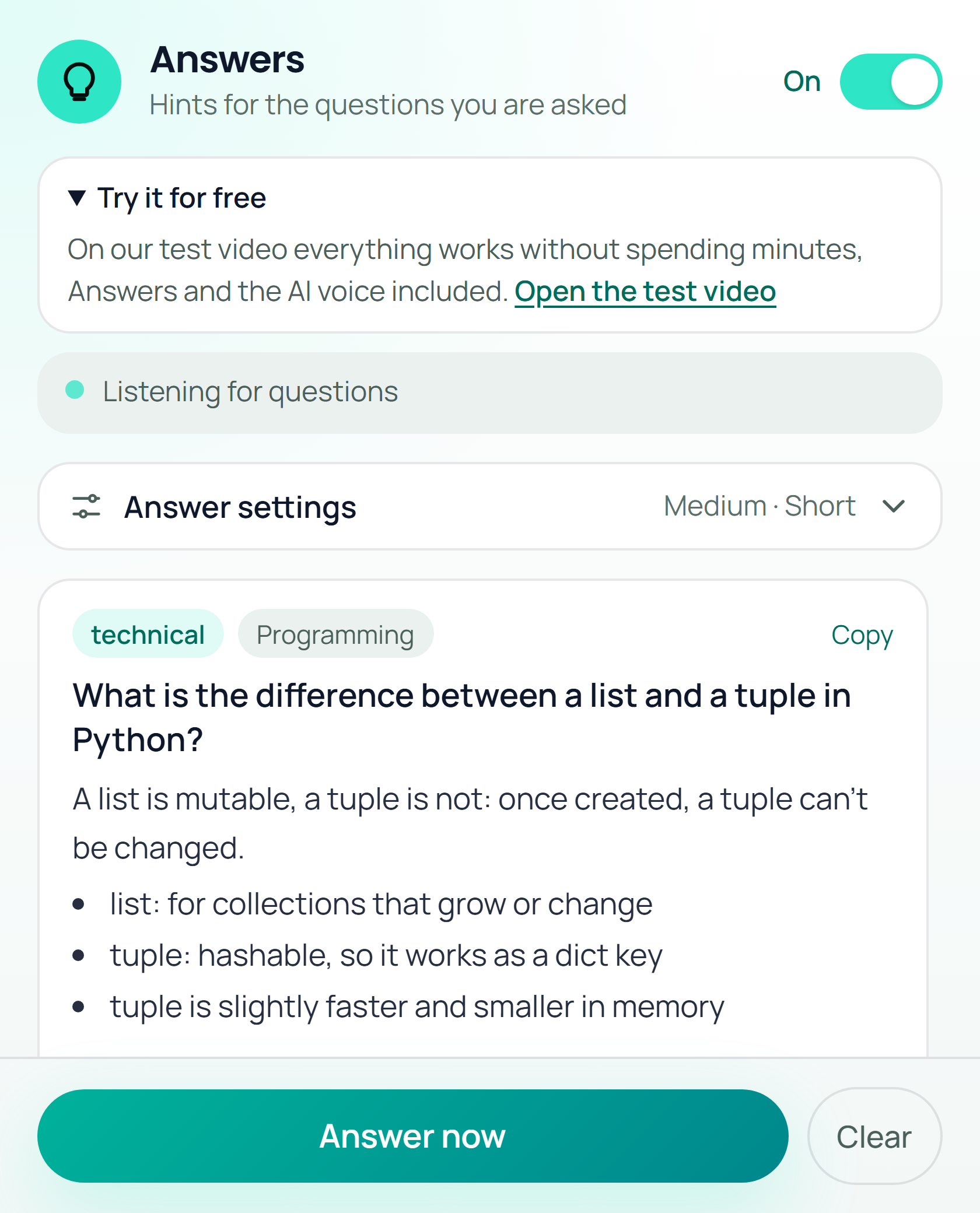
The picture is the real panel, rendered in the extension's test build with sample data, so it isn't a recording of a live call. The question was rephrased into a complete sentence, tagged technical and filed under programming. Below it is the answer, a sentence and a few bullets.
The panel works from the words SubLive already recognises for subtitles, so nothing is transcribed twice. After a short pause in the other person's speech it looks at their latest lines, finds a question if there is one, and decides whether it's the kind you'd normally look up.
Which questions get an answer
Small talk never does. "Can you hear me?" and "How was your weekend?" pass by without a card.
The rest depends on one setting, the question filter:
- Minimum takes only facts: a definition, a date, a rule.
- Medium adds technical and practical questions, such as how rate limiting works or how to structure a migration.
- Maximum adds opinions ("monolith or microservices?") and questions about you.
A topic filter narrows it further, to programming or law for example. A question that was already answered and comes back in other words is skipped. When you need something right now, Answer now takes the last thing the other person said, even if it wouldn't have passed the filter.
Length is a second setting: up to 50 words with a couple of bullets when you're glancing, up to 120 words with up to four when you have time to read.
There's also a short note about yourself, a line like "Senior Python developer, six years, FastAPI". The panel uses it for questions about you, so the answer starts from your background and not from a generic one.
Using it in a job interview
Check the rules first. Some employers and some assessments forbid any outside help, and a look-up counts as help. SubLive can't tell you which kind yours is, and an answer you read out without understanding tends to fall apart at the first follow-up.
What the panel is good at is the thing you'd otherwise type into a search box: the difference between two terms, what an abbreviation stands for, the name of the regulation the interviewer just mentioned. Questions about your own experience are better answered from your own experience.
The other person doesn't see the panel. It's a Chrome side panel on your computer, and nothing is added to the call or its participant list.
What happens to the questions
The words have to go somewhere to become an answer, so this is where they go.
- The other person's lines, as recognised for the subtitles. Only their questions are picked up, never yours.
- The question and your note about yourself go to our server and from there to the language model that writes the answer, the same kind of provider that translates the subtitles. The Subprocessors page lists who that is. Switching the panel on added no new third party.
- Questions and answers live in the panel while it's open and aren't written to a database. The server's log records that an answer was produced and its category, never the text. The note about yourself stays in your browser's local storage and travels only together with a question.
- No recording is created and audio isn't stored. A transcript exists only if you turned that on before the call.
- In the free mode, where Chrome's own features do the recognition and translation, there's no Answers panel.
The person on the other end is also being processed, in the sense that their speech becomes text. Whether you need to tell them depends on where you both are, and the recording and consent notice explains what SubLive does and doesn't do on that point.
What it gets wrong
Answers come from what the model already knows, so they can be wrong or out of date, and the panel doesn't search the web. Treat a card as a prompt for your memory. If it contradicts what you know, you're probably right.
There's a cap on answers per hour of conversation, and the panel only works while subtitles are running, since that's where it gets its words.
For teams
A company can store up to 300 prepared answers. When a question matches one, in any wording or language, the panel shows the company's answer instead of a generated one. That suits pricing, product and policy questions that must come out the same way every time. See Answers for the feature page and SubLive for business for the admin side.
Try it on a practice call
There's a 15-minute practice video for testing the panel: three AI-generated interviewers, from HR, engineering and law, ask eleven or twelve questions each. SubLive running on that video doesn't use any of your minutes. Install the extension, open the practice video, start subtitles on its tab and switch the panel on. Move the question filter between steps and watch which questions it picks up.
Answer suggestions during calls: questions
Does it work if the interviewer speaks another language?
Yes. The question is rephrased in your language and the answer arrives in it too. By default that's the language you read subtitles in, and the panel has a separate setting if you want answers in another one.
Which calls does it work on?
Wherever SubLive subtitles work: a call or video in a Chrome tab, including Meet, Zoom and Teams on the web.
Can I switch it off for one call?
There is a toggle at the top of the panel. Off means it stops picking up questions.